Channels & Inboxes
To get the most out of ChannelX, it helps to understand two words that sound similar but mean different things: channel and inbox.
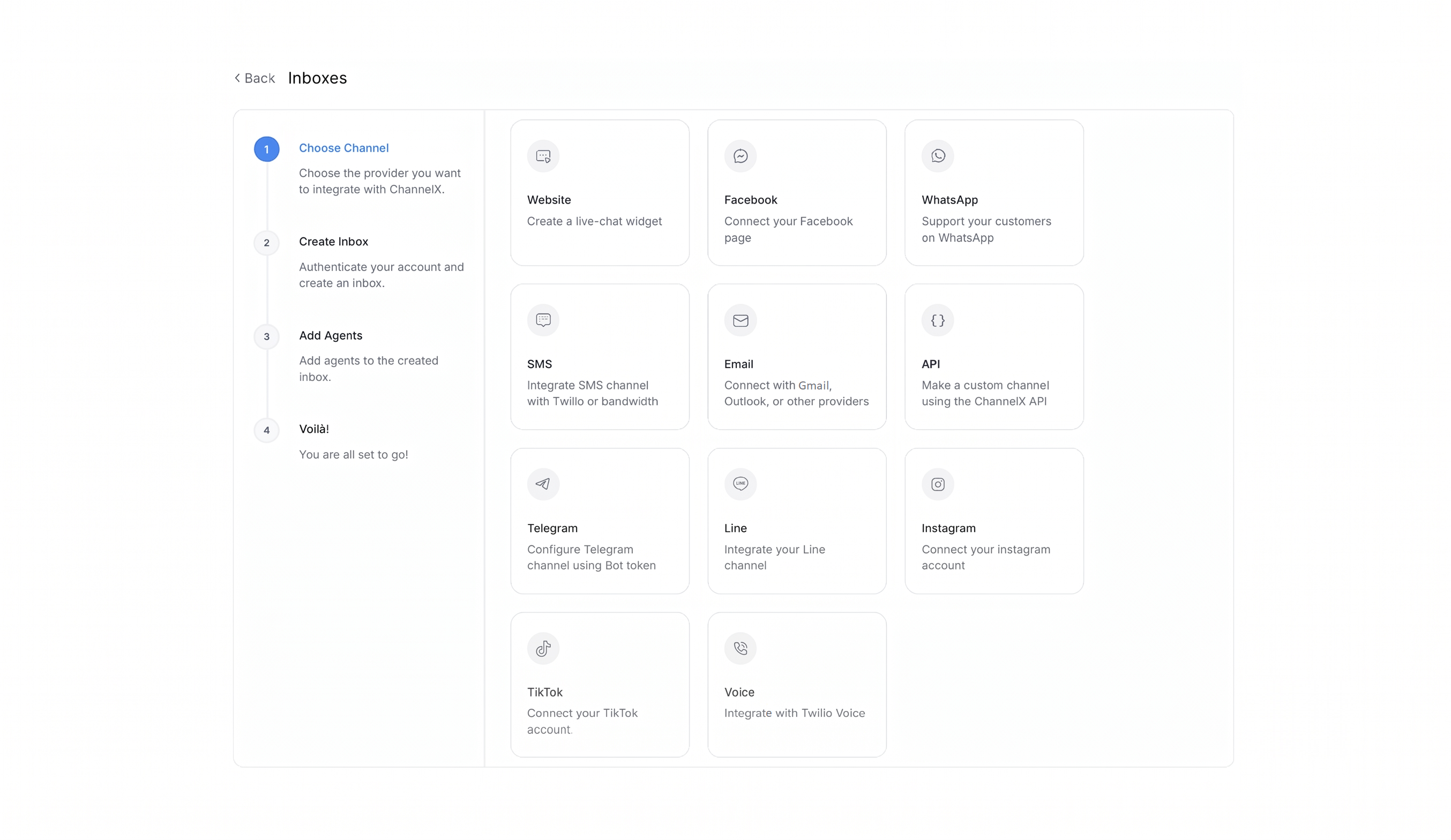
Channel vs. inbox
A channel is a type of communication — Website live chat, Email, WhatsApp, SMS, Instagram, and so on. It describes how a message travels.
An inbox is a specific instance of a channel that you have connected to your account. You can run several inboxes of the same channel type at once — for example, one Website inbox for your marketing site and another for your help center, or two WhatsApp numbers serving different regions.
Every conversation in ChannelX lives inside an inbox. Each inbox carries its own settings: the agents who can work it, business hours, greetings, the pre-chat form, and routing behavior. That separation is what lets one ChannelX deployment serve many brands, regions, or product lines without mixing their queues.
Adding an inbox
Open Settings → Inboxes → Add Inbox. This opens the channel picker. Choose the channel type, enter the credentials and settings it needs, add the agents who should staff it, and finish. The inbox is live immediately.
The channel types
Website (live chat widget)
The chat bubble on your site — the fastest channel to launch and the most common starting point. Give the inbox a name, point it at the website it will live on, choose a brand color, and write the welcome heading and tagline visitors see. After saving, ChannelX gives you a short code snippet to paste into your site, and the widget goes live.
Email
Handle support email inside ChannelX. Connect a Google or Microsoft mailbox by signing in with that provider, or connect any other provider by entering your incoming and outgoing mail server details manually.
Facebook Messenger
Receive and reply to direct messages sent to your Facebook Page. Sign in to Facebook, pick the Page you want messages from, and every Page DM arrives as a conversation alongside your other channels.
Instagram (DM)
Connect your Instagram Business account through the Meta sign-in flow — usually via the linked Facebook Page. Once connected, your Instagram DMs flow in with the same reply, label, and assignment workflow as any other channel.
TikTok
Sign in to your TikTok Business account, and customer messages on TikTok arrive in your ChannelX inbox.
WhatsApp
For two-way WhatsApp conversations, the WhatsApp Cloud API is the recommended choice for new accounts. Connect your phone number and WhatsApp Business Account through Meta's embedded sign-up flow.
Once connected, the message templates approved on your WhatsApp Business Account sync into ChannelX automatically. Templates are how you start outbound conversations and re-engage customers outside WhatsApp's 24-hour customer-service window — Meta's policy requires a pre-approved template for those messages, so they must be created and approved on Meta's side before you can send them.
SMS
For text-message conversations, ChannelX supports two providers:
- Twilio — connect your Twilio phone number and messaging credentials.
- Bandwidth — connect your Bandwidth phone number and credentials.
Customer texts then arrive as conversations, and your replies are delivered as SMS to the customer's phone.
Telegram
Create a bot in Telegram by chatting with BotFather (Telegram's official bot for creating bots), copy the bot token it gives you, and paste it into ChannelX. Your inbox now receives every message customers send to your bot.
LINE
Get your channel credentials from LINE Developers, paste them into ChannelX, and customer messages on your LINE Official Account arrive as conversations.
Nexus UC voice
Localcom's Nexus UC voice channel brings phone calls into the same unified inbox as your text channels, so a call and a chat from the same customer share one timeline and one contact record.
API channel
For anything that isn't a built-in type, the API channel connects a custom application — a niche messaging platform or an in-product chat experience inside your own software. You provide a destination URL where ChannelX sends outbound messages, and your application relays them onward.
Shared inboxes and collaborators
Inboxes in ChannelX are shared by design: more than one agent can work the same queue, see the same conversations, and pick up whatever is unassigned. This is what turns a pile of incoming messages into a team workflow rather than a personal mailbox.
Membership is explicit. An agent only sees an inbox after you add them to it under the Collaborators tab. Adding someone to your account does not automatically grant access to every inbox — even an administrator must add themselves as a collaborator to see an inbox in their own queue. On the same tab you can turn auto-assignment on or off, controlling whether new conversations are distributed automatically or left for agents to claim.
Common inbox-level options
A few options appear across most channels, on the Settings or Configuration tabs:
- Auto-assignment — when on, new conversations are distributed to the inbox's agents.
- Lock to single conversation — for channels without native threading (SMS, WhatsApp, Facebook, Instagram, API, LINE, TikTok, Telegram), this keeps each contact to one open conversation at a time. New messages reopen the existing conversation instead of starting a new one.
- Continuity via email — for Website inboxes, lets customers reply to email transcripts and have those replies land back in the same conversation.
- Sender name — choose Friendly (agent display name only) or Professional (display name plus business name) on outbound messages.
- Greeting — a toggle and message that auto-sends when a new conversation begins.
How the unified inbox ties it together
Because a contact record is account-wide, a single customer can hold conversations across many channels and still be one person in ChannelX. Each conversation lives in the inbox the message arrived on, but the contact's profile shows all of their conversations together — website chat, email thread, WhatsApp exchange, and phone call side by side. Agents get the full journey, internal notes carry forward, and nobody asks the customer to repeat themselves.
Common questions
Can I have more than one inbox of the same type? Yes. Multiple Website inboxes, multiple WhatsApp numbers, multiple email addresses — there is no restriction on type.
An agent can't see an inbox in their queue. Why? Inbox membership is explicit. Add them under the Collaborators tab.
What happens if I delete an inbox? The inbox and all its conversations are permanently removed and cannot be recovered. Export anything you need to keep first.
Is a contact the same across channels? Yes. The contact record is account-wide. Each conversation lives in the inbox it arrived on, but you see all of a contact's conversations in their profile.
Start with the website widget
If you're new to ChannelX, set up a Website inbox first. It's the quickest channel to launch and a good way to learn how inboxes, collaborators, and greetings fit together before connecting more complex channels.